Building an Agent-Maintained Zettelkasten in Obsidian
Set up an Obsidian Zettelkasten that Claude Code, Codex, and Hermes Agent maintain with digest, wiki, qna, and lint skills, after Karpathy's LLM Wiki.
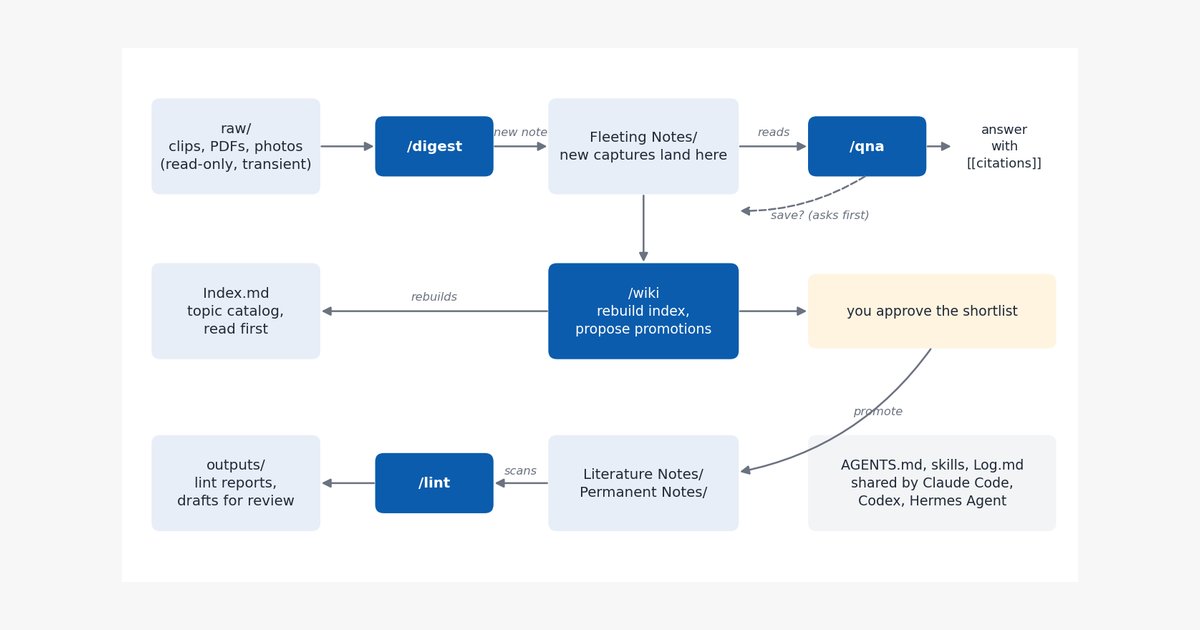
TL;DR: One Markdown file (
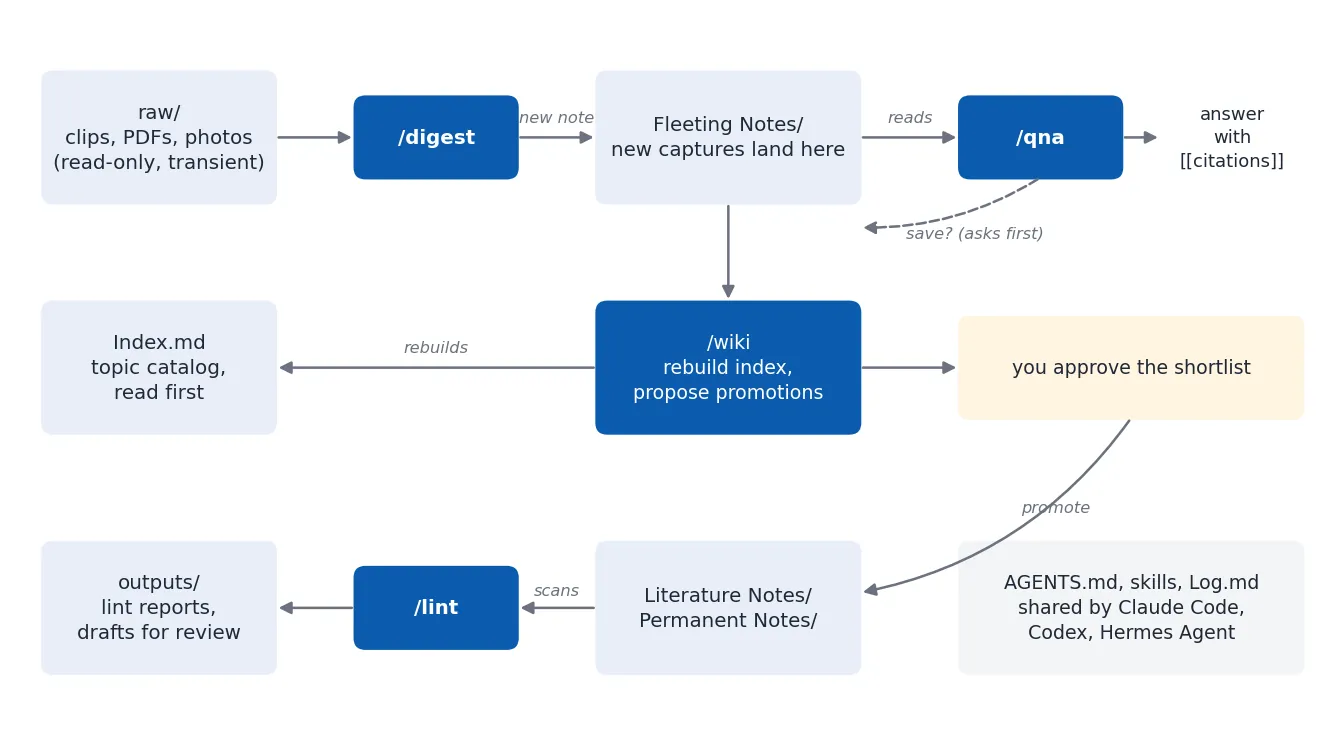
AGENTS.md) defines the vault’s structure and rules, four small skills (/digest,/wiki,/qna,/lint) do the maintenance, a fifth (/explain) turns notes into pages you can actually read, and anIndex.mdplus an append-onlyLog.mdlet any coding agent find its way around. Everything is packaged as llm-wiki-vault, an installer that sets the whole thing up in a minute.
A personal knowledge base fails in a predictable way: capturing is cheap, so notes pile up, while the upkeep (linking, merging, re-indexing, catching contradictions) never happens. Andrej Karpathy’s LLM Wiki proposes handing that upkeep to an LLM: raw sources go in one folder, the model compiles them into an interlinked Markdown wiki, and a schema file tells it how. In his words, “Obsidian is the IDE; the LLM is the programmer; the wiki is the codebase.”
This post describes a working variant of that idea built on a Zettelkasten instead of a flat wiki, maintained by three different agents: Claude Code, OpenAI Codex, and Hermes Agent running a local open-weight model. Everything below is plain files, so the same vault works with whichever agent you have.
From LLM Wiki to an Agent-Maintained Zettelkasten
This section maps Karpathy’s three layers onto Zettelkasten note types and explains the two changes that matter in practice.
The LLM Wiki has raw sources (immutable input), the wiki (pages the LLM writes and owns), and a schema (CLAUDE.md or AGENTS.md) describing structure and workflows. Its operations are ingest, query, and lint, and two special files, index.md and log.md, act as the catalog and the history.
A Zettelkasten adds a maturity axis that a flat wiki lacks. New material lands as a fleeting note: a few dense bullets, cheap to write and allowed to be rough. Fleeting notes on one theme later get synthesized into a literature note, and the rare idea that becomes reference material turns into a permanent note. The agent’s job splits accordingly. It captures freely at the fleeting level, but every step up the ladder is a proposal that you approve, because deciding what is worth keeping is the part of knowledge work you don’t want to delegate.
The second change concerns raw/. In the LLM Wiki, raw sources are kept forever. Here raw/ is an inbox: web clips, PDFs, and photos of handwritten pages wait there until an agent digests them, and then you are free to delete them. That one decision forces a rule that keeps the vault healthy: no note may link into raw/. A note cites its original origin (a URL, a DOI, or a plain description like “conference talk slides, March 2026”) and copies any image it needs into Files/, so it still reads correctly after the inbox is emptied.
The Folder Layout
The structure is deliberately boring, so that any agent can infer it from one read of the schema.
1
2
3
4
5
6
7
8
9
10
11
12
13
14
15
external-brain/
  AGENTS.md            rules every agent reads
  CLAUDE.md            one line: @AGENTS.md
  Index.md             topic catalog, rebuilt by /wiki
  Log.md               append-only history, one line per change
  wiki_lint.py         link checker that /lint runs
  raw/                 inbox of sources (read-only for agents, transient)
  Fleeting Notes/      quick captures, type: fleeting
  Literature Notes/    syntheses, type: literature
  Permanent Notes/     reference notes, type: permanent
  Files/               images and attachments that notes embed
  Templates/           note templates
  outputs/             lint reports and drafts waiting for review
  .claude/skills/      skills for Claude Code
  .agents/skills/      skills for Codex and Hermes Agent
Index.md deserves a word. It is a plain Markdown list of every note, grouped by topic, with a one-line summary per synthesized note. It is not a Dataview query, on purpose: an agent working in another repository can read it as text and find the right three notes without grepping hundreds of files. Karpathy reports the same thing, that a well-kept index carries a long way before embedding search becomes necessary.
Every note carries YAML frontmatter, which is what makes the vault queryable both by agents and by Obsidian’s built-in Bases views:
1
2
3
4
5
6
7
8
9
---
title: "Kelly Criterion"
type: fleeting          # fleeting | literature | permanent
created: 2026-01-31T09:00:00
updated:
tags: ["#position-sizing"]
topic: ["[[Risk Management]]"]
sources: ["https://en.wikipedia.org/wiki/Kelly_criterion"]
---
topic: holds wikilinks to concept notes, and /wiki clusters the index by those links, so the taxonomy emerges from the notes rather than being designed up front.
One Instruction File for Every Agent
The schema lives in AGENTS.md, because that is the file most coding agents already look for. This section shows how each agent finds it and what goes in it.
Codex reads AGENTS.md natively. Claude Code reads CLAUDE.md, so that file contains a single import line, @AGENTS.md, and nothing else. Hermes Agent loads the first non-empty file from .hermes.md, AGENTS.md, CLAUDE.md, and .cursorrules, in that order, so it also lands on AGENTS.md as long as you never create a .hermes.md. The result is one source of truth: you change a rule once and all three agents follow it.
Here is the AGENTS.md the installer writes. It is short because agents read it on every session, and a small local model pays for every token of it.
1
2
3
4
5
6
7
8
9
10
11
12
13
14
15
16
17
18
19
20
21
22
23
24
25
26
27
28
29
30
31
32
33
34
35
36
37
38
39
40
41
42
43
44
45
46
47
48
49
50
51
52
53
54
55
56
57
58
59
60
61
62
63
64
65
66
67
68
69
70
71
72
73
74
75
76
77
78
79
80
81
82
83
84
85
86
87
88
89
90
91
92
93
94
# External Brain: guide for AI agents

A Zettelkasten-style Obsidian vault maintained together with AI coding agents.
Claude Code reads this file through `CLAUDE.md`; Codex and Hermes Agent read it
directly. Edit rules here, never in `CLAUDE.md`.

## Folders

- `raw/`: sources waiting to be digested (web clips, PDFs, transcripts, photos
  of handwritten notes). Agents read it and never edit, move, or delete it. It
  is transient: the owner clears it after digestion, so no note may link,
  embed, or cite a `raw/` path.
- `Fleeting Notes/`: quick captures, `type: fleeting`. Every new note lands here.
- `Literature Notes/`: synthesized write-ups of several fleeting notes or
  sources, `type: literature`.
- `Permanent Notes/`: reference-quality notes, rarely edited, `type: permanent`.
- `Files/`: images and attachments that notes embed.
- `Templates/`: note templates. Quote `{{placeholders}}` inside frontmatter.
- `outputs/`: generated reports and drafts waiting for review.
- `Index.md`: topic-grouped catalog of every note, rebuilt by `/wiki`. Read it
  first to find notes; then read the notes themselves.
- `Log.md`: append-only log, one line per change. Read only its last 30 lines.

## Frontmatter

```yaml
---
title: "Note title"
type: fleeting          # fleeting | literature | permanent
created: 2026-01-31T09:00:00
updated:
tags: ["#tag"]
topic: ["[[Concept Note]]"]
sources: []             # URL, DOI, [[note]], or a plain description; never raw/
---
```

## Rules

- Distill, don't transcribe. A fleeting note is a few dense bullets.
- Link related notes with `[[wikilinks]]`; prefer an existing topic over a new one.
- Never promote a note to Literature or Permanent without the owner's approval.
- Never move or delete a fleeting note. After a promotion, append
  `Promoted to [[New Note]]` to its last line.
- A fact added from outside the vault is marked as LLM-suggested, with a source.
- Log every write in `Log.md` (Hermes uses `Log-hermes.md`):
  `- YYYY-MM-DD | <agent> | <skill> | what changed`.

## Writing style

A light version of ASD-STE100 Simplified Technical English, for all new text.

- One instruction per sentence; steps in the imperative, at most 20 words.
- Descriptive sentences at most 25 words; one topic per paragraph.
- Active voice. The same word for the same thing every time.
- Common words: use, start, make sure, before (not utilize, commence, ensure,
  prior to). A vertical list for three or more parallel items.
- Keep technical terms, code, and quotes exactly as they are.

## Write lock

One agent writes at a time. Before any write, run
`mkdir -p .locks && mkdir .locks/vault-write.lock`. The second `mkdir` fails
if another agent holds the lock. Then write `<agent> | <ISO time> | <task>` to
`.locks/vault-write.lock/owner`. Remove the lock directory when the whole
operation is done. A lock older than 30 minutes is stale, but ask the owner
before removing it.

## Git sync

The lock works on one machine only, because `.locks/` is not synced.

- An agent on a second machine runs `git pull --rebase` before every write.
- After the write, it commits only the files it created, then pushes.
- If the pull or the push fails, it stops and tells the owner. It never
  resolves a conflict itself.
- If obsidian-git runs on the main machine, it commits on a timer. Don't
  commit routine edits by hand.

## Agents and roles

- Claude Code and Codex: all skills (`/digest`, `/wiki`, `/qna`, `/lint`,
  `/explain`).
- Hermes Agent on a small local model: `/qna`, and `/digest` into new fleeting
  notes only. It never edits existing notes, rebuilds `Index.md`, promotes, or
  applies lint fixes, and it logs to `Log-hermes.md` instead of `Log.md`.
  The skills it must not run (`/wiki`, `/lint`, `/explain`) say so in their
  first line.

## About this file

Installed by llm-wiki-vault (https://github.com/baobach/llm-wiki-vault).
Change it freely: `install.sh --update-skills` updates the skills and
`wiki_lint.py`, and never touches this file.
Two lines in it do more work than they appear to. “Read only its last 30 lines” keeps Log.md from eating the context window once it holds a year of history. “Quote placeholders inside frontmatter” exists because Obsidian’s Properties editor rewrites an unquoted {{title}} into broken nested YAML the first time you open the template, a bug you only want to hit once.
Four Skills That Do the Upkeep
Skills are folders with a SKILL.md file: YAML frontmatter with a name and a description, then plain instructions. This section covers what each of the four does and where each agent looks for them.
The format is shared across agents through the Agent Skills convention. Claude Code loads skills from .claude/skills/<name>/SKILL.md and runs one when you type /digest. Codex loads repository skills from .agents/skills/ and runs one when you type $digest or pick it from /skills. Hermes Agent also reads .agents/skills/, but only for directories you have marked as trusted, a one-time setting per machine:
1
hermes config set skills.trusted_project_dirs '["/home/you/external-brain"]'
Check the current value before you set it, since the command replaces the whole list. Both Codex and Claude Code also pick a skill on their own when your request matches its description, which is why each description says when to use the skill, not just what it does.
/digest turns a source into a fleeting note. Its instructions are the most detailed of the four, because this is where a model is most tempted to paste the article verbatim:
1
2
3
4
5
6
7
8
9
10
11
12
13
14
15
16
17
18
19
---
name: digest
description: Turn a file in raw/, a URL, or pasted text into a new fleeting note that cites its origin. Use when the user drops a source into raw/, shares a link, or asks to digest or save something into the vault.
---

# /digest

1. Check `Log.md` and the `sources:` fields for the same source. If it was
   digested before, say so and ask before creating a second note.
2. Take the write lock (see `AGENTS.md`).
3. Read the source. Distill the ideas worth keeping into a few dense bullets;
   don't copy it.
4. Write `Fleeting Notes/<Title>.md` with the frontmatter from `AGENTS.md`.
   `sources:` holds the original URL or a plain description, never a `raw/` path.
5. Copy any image the note needs into `Files/` and embed it with `![[name.png]]`.
6. Link two or three related notes that `Index.md` lists.
7. Append to your log (`Log.md`; Hermes uses `Log-hermes.md`):
   `- <date> | <agent> | /digest | <source> -> [[New Note]]`.
8. Release the lock and tell the user the `raw/` file can now be removed.
The duplicate check in step 1 is cheap insurance: Log.md records every digested source, so a second clip of the same article gets caught before it becomes a second note.
/wiki has two jobs. It rebuilds Index.md from the frontmatter of every note, clustering by topic: links and listing notes without a topic under “Uncategorized” instead of guessing. Then it scans the fleeting notes for ones with real substance and proposes a promotion shortlist, one line of reasoning per item, and stops. Only after you approve does it write the literature note, list the fleeting notes in its sources:, and append a “Promoted to” breadcrumb to each source. Fleeting notes are never moved or deleted, so the trail from a raw idea to the finished note stays intact.
/qna answers questions from your own notes. It reads Index.md, then at most a handful of the notes it points to, and answers with a wikilink citation for every note it used. Two rules keep it honest: the index is a catalog, never a source, and when the vault is silent on part of a question the answer says so instead of filling the gap with general knowledge dressed up as yours. A novel answer can be saved as a new fleeting note, but only after you say yes.
/lint is the periodic health check: broken wikilinks, links into raw/, orphan notes, malformed frontmatter, contradictions between notes, and concepts that several notes mention but none explains. The skill splits its findings into two tiers. Mechanical problems with exactly one right answer (a link that is a typo of an existing note, broken YAML) get fixed directly. Everything that needs judgment (a contradiction, a title that disagrees with its filename, a fact pulled from the web) goes into outputs/lint-<date>.md for you to decide. The report also has to say what it skipped, for example “checked contradictions only within the five most active clusters”, so a partial check never passes for a full one.
Running Several Agents on One Vault
A strong model and a small one can share the vault if they cannot step on each other. This section covers roles, the lock, and git.
The roles in AGENTS.md follow capability. A frontier model (Claude Code or Codex) does curation: rebuilding the index, promotions, lint fixes, and syntheses of long sources. A 27B open-weight model behind Hermes is good at quick capture and lookups, so it gets /qna and /digest into new fleeting notes, and nothing that rewrites existing content. Its notes may contain mistakes, which is acceptable precisely because they are fleeting: the next /wiki or /lint pass by the stronger model reviews them before anything is promoted. Codex and Hermes read the same .agents/skills/ folder, so Hermes sees /wiki, /lint, and /explain too. A rule in the roles section alone is easy for a small model to miss once it is deep in a task, so each of those three skills also opens with one line that tells Hermes to stop and hand the job back. The model reads that line at the exact moment it would act.
On a single machine, the write lock prevents two agents from editing the same file at once. It relies on mkdir being atomic: exactly one caller can create the directory.
1
2
3
4
5
6
7
8
mkdir -p .locks
if mkdir .locks/vault-write.lock 2>/dev/null; then
  echo "codex | $(date -u +%FT%TZ) | /digest paper.pdf" > .locks/vault-write.lock/owner
  # ... write the note, append to Log.md ...
  rm -r .locks/vault-write.lock
else
  cat .locks/vault-write.lock/owner   # who holds it, and since when
fi
.locks/ is gitignored, which means the lock cannot coordinate agents on different machines, and a fresh clone has no .locks/ folder at all (hence the mkdir -p). Git does the cross-machine job instead, and the “Git sync” section of AGENTS.md spells it out. The agent on the second machine runs git pull --rebase before writing, commits only the files it created, and pushes immediately. If the pull or the push fails, it stops and reports instead of resolving the conflict itself. It also appends to its own Log-hermes.md, so two machines never append to the same file; the stronger agent reads the tail of both logs during /wiki and /lint. On the main machine, the obsidian-git plugin commits your own edits on a timer, so you never commit by hand.
One more trap: Hermes ships a bundled llm-wiki skill that expects a different layout (SCHEMA.md, entities/, concepts/). Leave it unused in this vault, or it will start creating folders your other agents know nothing about.
Reading What the Agents Write
Once agents do the upkeep, most of your time in the vault goes to reading what they wrote. This section covers two changes that make that reading faster.
The first is a writing rule. In a thread on LLM output formats, Karpathy suggests asking for text “80% of the way to ASD-STE100”, the controlled English that aircraft maintenance manuals use. The full specification has an approved dictionary of about 900 words, which is too strict for notes, but its sentence rules transfer well. The “Writing style” section of the AGENTS.md above keeps those rules: one instruction per sentence, steps in the imperative and at most 20 words, descriptive sentences at most 25 words, active voice, and the same word for the same thing every time. The rule applies to the skills themselves too. A 27B model follows “Take the write lock. Then write the note.” far more reliably than one long sentence with three conditions in it.
The second is a richer output format. A /qna answer about a flow or a hierarchy can carry a small Mermaid diagram, which Obsidian renders natively and git can diff. For a whole topic, the fifth skill, /explain, reads the relevant notes and writes one self-contained HTML page to outputs/, with inline SVG diagrams, an interactive part where it helps, and a link back to every note it used. The page is meant to be thrown away after you have understood the topic: no note links to it, and /lint reminds you to delete old ones.
Setting It Up
Everything above ships as llm-wiki-vault, an MIT-licensed repository with the installer, the five skills, the AGENTS.md template, and the link checker. The installer creates the folders, AGENTS.md, CLAUDE.md, Index.md, Log.md, a note template, the skills for Claude Code (.claude/skills/) and for Codex and Hermes (.agents/skills/), wiki_lint.py, and a git repository. It never overwrites an existing file, so you can also run it over an existing vault to add only what is missing. Install from a clone, or with one line pinned to a release:
1
2
3
4
5
git clone https://github.com/baobach/llm-wiki-vault.git
cd llm-wiki-vault && ./install.sh ~/external-brain

# or, without cloning (read install.sh on GitHub first):
curl -fsSL https://raw.githubusercontent.com/baobach/llm-wiki-vault/v0.1.0/install.sh | bash -s -- ~/external-brain
1
2
3
4
5
6
7
8
9
10
11
12
13
14
15
16
17
18
19
20
21
22
23
24
25
26
27
28
29
30
> downloading baobach/llm-wiki-vault@v0.1.0
> llm-wiki-vault 0.1.0 into /Users/you/external-brain
added   AGENTS.md
added   CLAUDE.md
added   Index.md
added   Log.md
added   Templates/Note Template.md
added   .gitignore
added   .claude/skills/digest/SKILL.md
added   .agents/skills/digest/SKILL.md
added   .claude/skills/wiki/SKILL.md
added   .agents/skills/wiki/SKILL.md
added   .claude/skills/qna/SKILL.md
added   .agents/skills/qna/SKILL.md
added   .claude/skills/lint/SKILL.md
added   .agents/skills/lint/SKILL.md
added   .claude/skills/explain/SKILL.md
added   .agents/skills/explain/SKILL.md
added   wiki_lint.py
added   .git (git init)

> done: 17 added, 0 updated
Next steps:
  1. Open "/Users/you/external-brain" as a vault in Obsidian.
  2. Claude Code: cd into the vault, run claude, then /digest, /qna, /wiki, /lint, /explain.
     Codex: run codex in the vault, then $digest (or /skills).
     Hermes Agent: trust the vault once per machine (this replaces the whole list,
     so include any folders you already trust):
       hermes config set skills.trusted_project_dirs '["/Users/you/external-brain"]'
  3. Keep the vault in a private git repository: it holds your notes.
Updates come through the same script: ./install.sh --update-skills ~/external-brain after a git pull replaces the skills and the linter with the new version, keeps each replaced file as a timestamped backup, and adds a line to Log.md. It never touches your AGENTS.md, since that is the file you are meant to customize. If you only want the skill files in an existing setup, npx skills add baobach/llm-wiki-vault installs them with the skills CLI, but they expect the folders and rules that the installer provides.
Then open the folder as a vault in Obsidian, point the core Templates plugin at Templates/, and install the Web Clipper with its output folder set to raw/. From then on, the daily loop is short: clip something and run /digest, ask questions with /qna (or /explain for a whole topic), run /wiki once a week or so to refresh the index and review promotions, and run /lint every few weeks.
A Deterministic Link Checker
The mechanical half of /lint doesn’t need a model at all. This section gives a standard-library script that agents (or a git hook) can run before spending tokens on the judgment calls.
The script checks the three note folders for missing frontmatter fields, broken wikilinks, links or sources: entries pointing into raw/, and notes with no links in either direction. Links from Index.md and Log.md don’t count toward that last check, since those two pages list every note and would hide every orphan. Link targets resolve the way Obsidian resolves them: a note by its file name without .md, an image or PDF by its full name, anywhere in the vault.
1
2
3
4
5
6
7
8
9
10
11
12
13
14
15
16
17
18
19
20
21
22
23
24
25
26
27
28
29
30
31
32
33
34
35
36
37
38
39
40
41
42
43
44
45
46
47
48
49
50
51
52
53
54
55
56
57
58
59
60
61
62
63
64
65
66
67
68
69
70
71
72
73
74
75
76
77
78
79
import re
import sys
from pathlib import Path

NOTE_DIRS = ["Fleeting Notes", "Literature Notes", "Permanent Notes"]
REQUIRED = ["title", "type", "created"]
# pages that list every note; their links don't rescue a note from isolation
CATALOGS = {"index.md", "log.md", "log-hermes.md"}
WIKILINK = re.compile(r"!?\[\[([^\]|#]+)(?:#[^\]|]*)?(?:\|[^\]]*)?\]\]")
FRONTMATTER = re.compile(r"\A---\n(.*?)\n---\n", re.S)


def frontmatter_keys(text: str) -> set[str]:
    m = FRONTMATTER.match(text)
    if not m:
        return set()
    return {line.split(":", 1)[0].strip() for line in m.group(1).splitlines()
            if re.match(r"^[A-Za-z_][\w-]*:", line)}


def main(root: Path) -> int:
    # any file can be a link target (notes by stem, images and PDFs by name);
    # names that exist only under raw/ count as links into raw/
    def names(files):
        return {n.lower() for f in files for n in (f.stem, f.name)}

    files = [p for p in root.rglob("*") if p.is_file() and ".git" not in p.parts]
    in_raw = [p for p in files if p.relative_to(root).parts[0] == "raw"]
    targets = names(p for p in files if p not in in_raw)
    raw_only = names(in_raw) - targets

    notes = [p for d in NOTE_DIRS for p in sorted((root / d).glob("*.md"))]
    outgoing: dict[str, set[str]] = {}
    problems: list[str] = []

    for note in notes:
        text = note.read_text(encoding="utf-8")
        rel = note.relative_to(root)
        missing = [k for k in REQUIRED if k not in frontmatter_keys(text)]
        if missing:
            problems.append(f"{rel}: frontmatter missing {', '.join(missing)}")
        links = set()
        for target in WIKILINK.findall(text):
            name = target.strip().split("/")[-1].lower()
            links.add(name)
            if target.strip().lower().startswith("raw/") or name in raw_only:
                problems.append(f"{rel}: links into raw/: [[{target}]]")
            elif name not in targets:
                problems.append(f"{rel}: broken link [[{target}]]")
        if re.search(r"^sources:.*\braw/", text, re.M):
            problems.append(f"{rel}: sources cites a raw/ path")
        outgoing[note.stem.lower()] = links

    # incoming links from any note or page, but not from the catalogs, raw/,
    # or hidden folders such as .claude/ whose skills hold example links
    incoming: dict[str, int] = {}
    for md in root.rglob("*.md"):
        parts = md.relative_to(root).parts
        if parts[0] == "raw" or any(part.startswith(".") for part in parts):
            continue
        if len(parts) == 1 and md.name.lower() in CATALOGS:
            continue
        for target in WIKILINK.findall(md.read_text(encoding="utf-8")):
            name = target.strip().split("/")[-1].lower()
            if name != md.stem.lower():
                incoming[name] = incoming.get(name, 0) + 1
    for note in notes:
        key = note.stem.lower()
        if not incoming.get(key) and not outgoing.get(key):
            problems.append(f"{note.relative_to(root)}: isolated (no links in or out)")

    for line in problems:
        print(line)
    print(f"{len(notes)} notes checked, {len(problems)} problem(s)")
    return 1 if problems else 0


if __name__ == "__main__":
    sys.exit(main(Path(sys.argv[1] if len(sys.argv) > 1 else ".").resolve()))
Run against a fresh vault with three planted mistakes (a missing concept note, a note citing a clipped file in raw/, and a stub with incomplete frontmatter), it reports each one and exits with status 1:
1
2
3
4
5
6
7
$ python3 wiki_lint.py ~/external-brain
Fleeting Notes/Fractional Kelly.md: links into raw/: [[clip]]
Fleeting Notes/Fractional Kelly.md: sources cites a raw/ path
Fleeting Notes/Kelly Criterion.md: broken link [[Position Sizing]]
Fleeting Notes/Lonely.md: frontmatter missing type, created
Fleeting Notes/Lonely.md: isolated (no links in or out)
3 notes checked, 5 problem(s)
Not every broken link is a mistake. A link to a concept note that doesn’t exist yet, like [[Position Sizing]] above, is also a list of notes worth writing, which is exactly the “missing concept” finding the /lint skill reports for you to act on.
What This Leaves Open
The setup works because each piece is a file an agent can read: one schema, five short skills, a catalog, and a log, with promotion to durable notes always gated by you. Its weak point is scale, since a hand-readable Index.md becomes too long once the vault passes a few thousand notes, and at that point a local search engine such as Karpathy’s suggestion of qmd belongs in /qna. Contradiction checks are also only as thorough as the pairs the model chooses to compare, so the lint report’s “what I skipped” section matters more than its findings.
What are your thoughts? Discuss in the comments below or connect with me on LinkedIn.